Every certificate issued, renewed and installed. Automatically.
NeverLapse Cert gets certificates through your DNS, renews them before they expire and puts them where they're used: IIS, Exchange, Remote Desktop Services, Apache, nginx, Tomcat, HAProxy, OPNsense, Veeam, VMware Cloud Director and more. One web console, on your own server.
The renewal clock is speeding up
Public certificates are getting shorter lives. A certificate you renew twice a year today needs renewing about eight times a year by 2029. Across every website, mail server, VPN and backup gateway, renewing by hand stops being a chore and becomes an outage waiting to happen.
Maximum public certificate lifetimes. Source: CA/Browser Forum ballot SC-081.
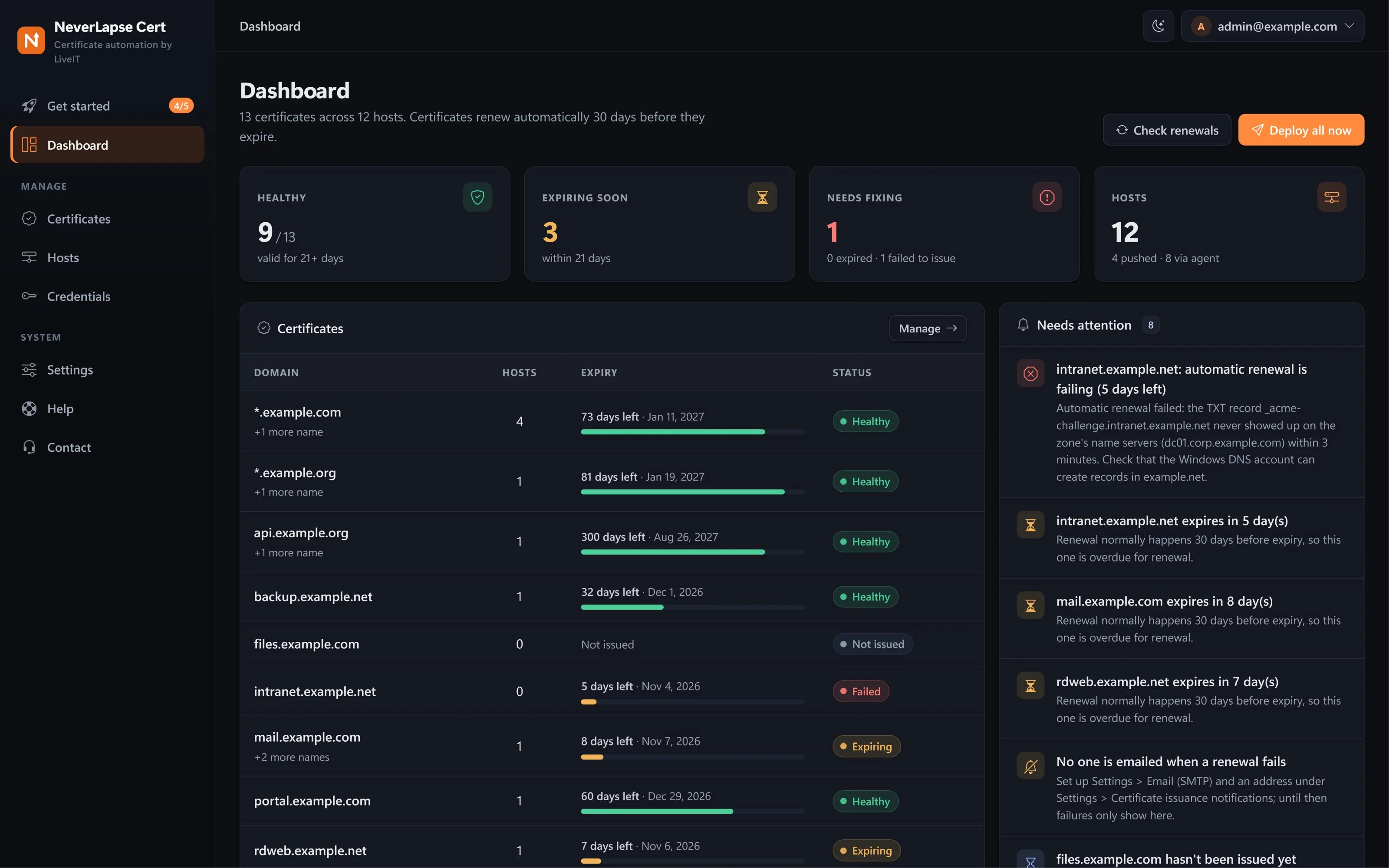
Everything about your certificates on one screen
Know what needs you the moment you sign in
The dashboard counts what's healthy, what's expiring and what's broken, and lists exactly what needs a person, in plain words. Everything else is already handled.
- Healthy, expiring soon and needs-fixing at a glance
- A Needs attention list with the reason and the fix
- Light and dark themes
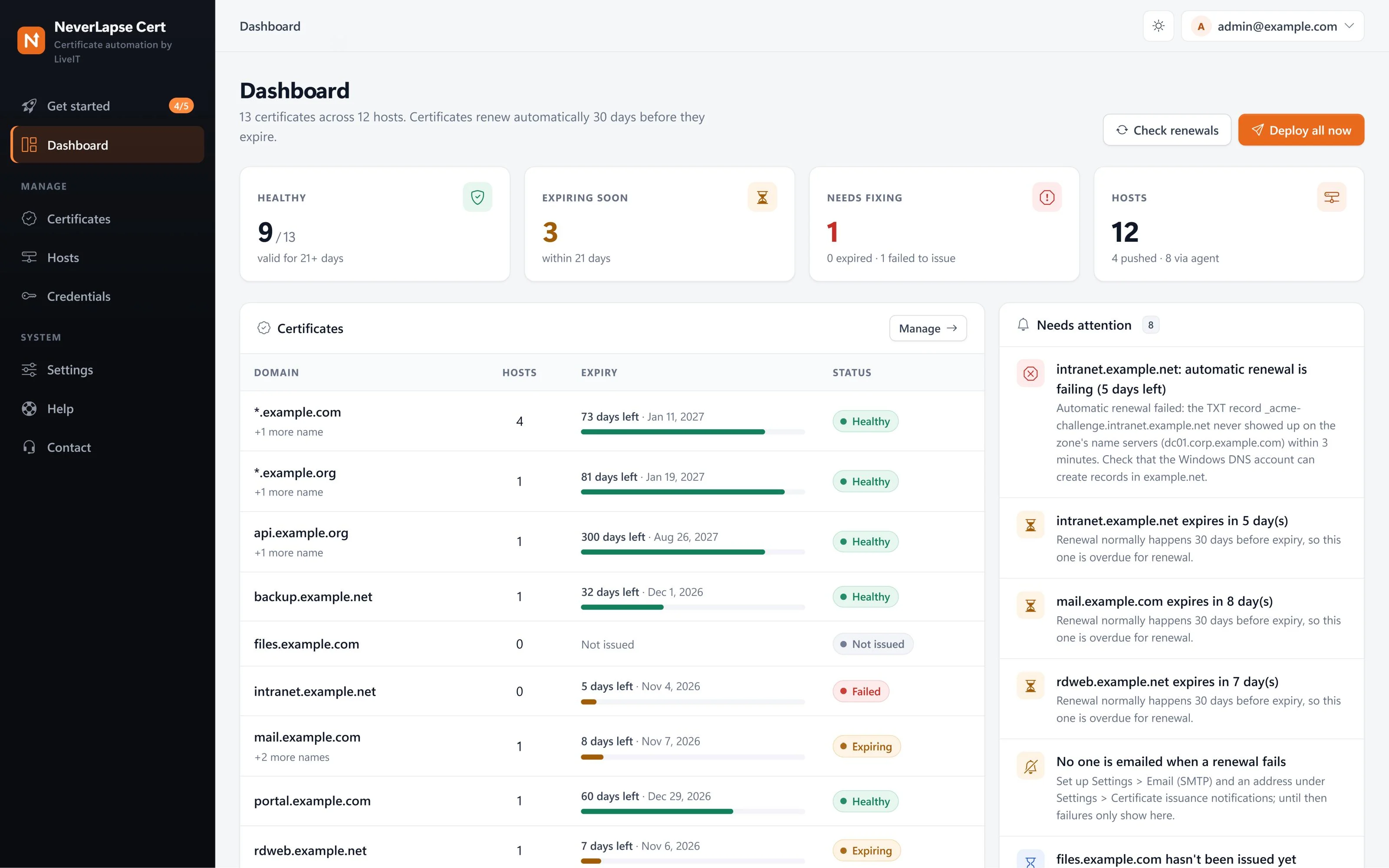
Every certificate, and how long it has left
Each certificate shows its CA, its DNS provider, how many servers use it, the days left on an expiry bar and its status. Nothing hides in a spreadsheet or on one admin's laptop.
- Wildcards (
*.example.com) and multi-name certificates - Let's Encrypt, ZeroSSL and DigiCert side by side in one list
- Renews by itself, 30 days before expiry by default
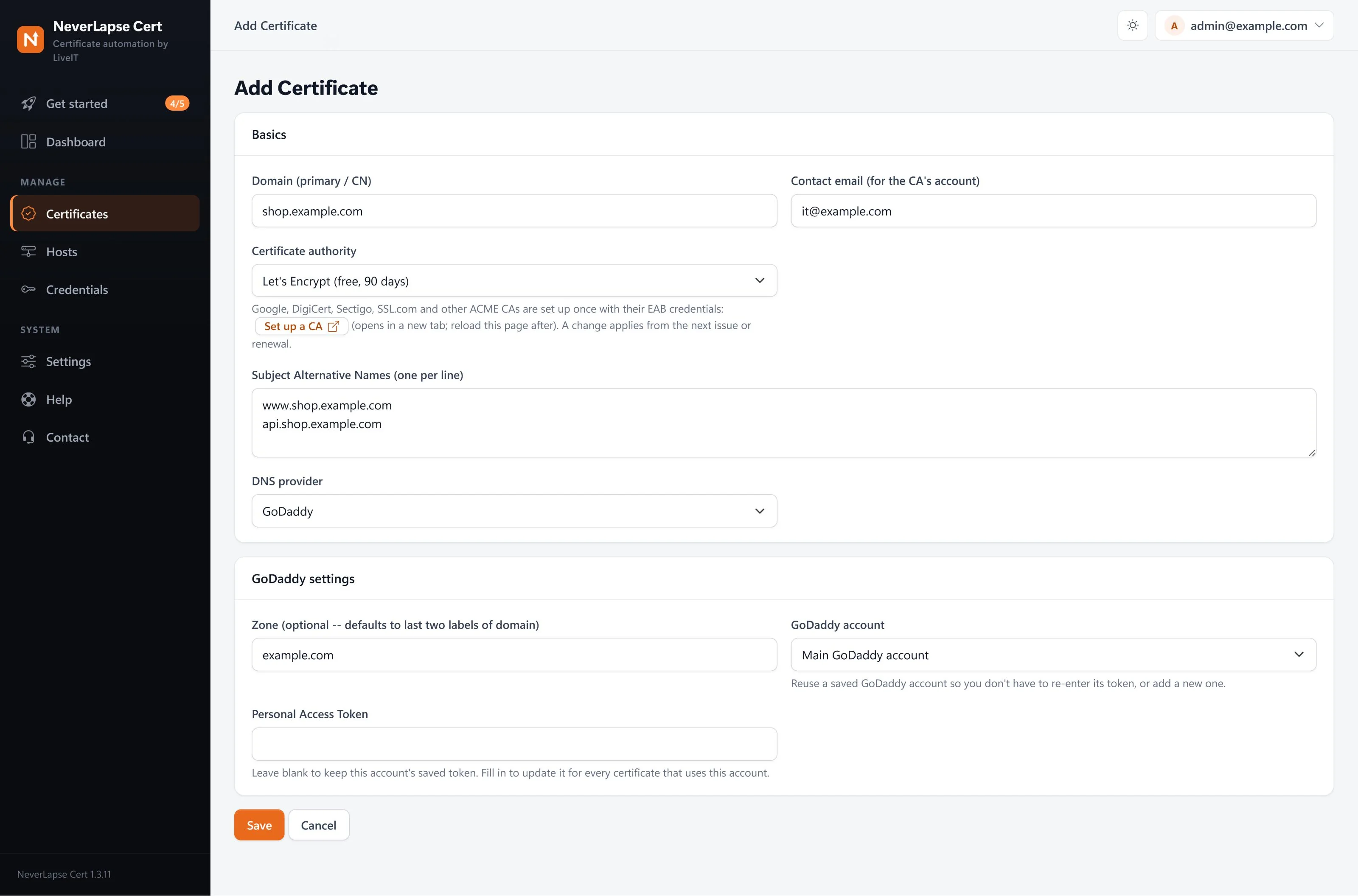
Add a certificate in a minute
Type the names, pick the certificate authority and your DNS provider. NeverLapse proves you own the domain with a short-lived DNS record, so there are no ports to open and it works for servers that aren't on the internet at all.
- DNS validation through Cloudflare, GoDaddy, Azure DNS, Amazon Route 53, Google Cloud DNS, Namecheap, IONOS, cPanel, DigitalOcean, DNS Made Easy, DNSimple, Name.com, Windows DNS, BIND, NeverLapse DNS (any DNS host, included) or your own acme-dns server
- Saved DNS accounts are reused for every certificate in that zone
- Extra names (SANs) on the same certificate
Watch it issue, live
Click Issue now and a window shows each step as it happens: the DNS record going in, the wait until it's visible, the CA's check, the new certificate. If something needs a fix, it stops at once and says what, in plain words, with a Fix it button.
- Checks your own name servers before asking the CA, so a typo costs nothing
- Retries slow DNS instead of failing on the first try
- Emails you when something needs you
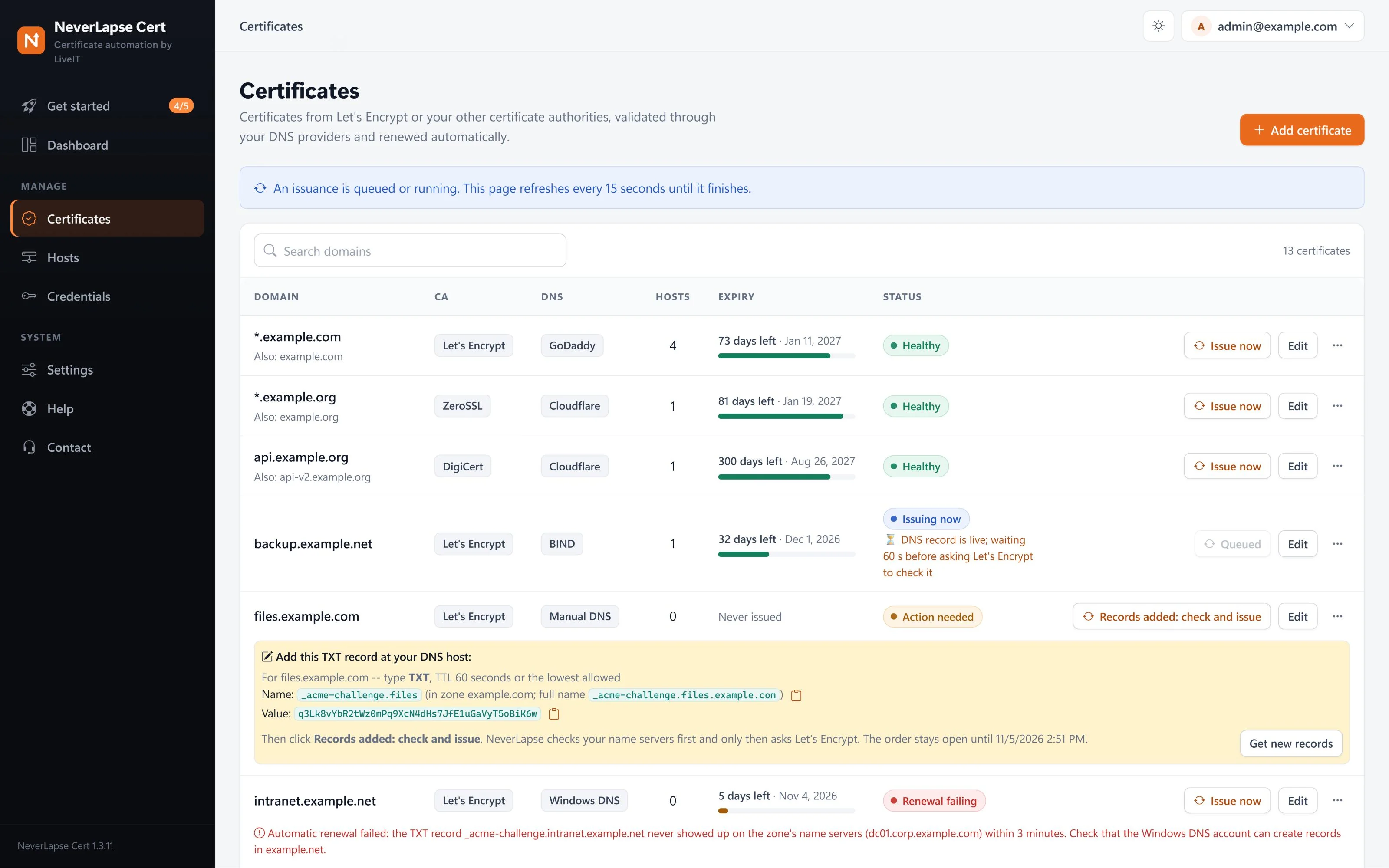
Any DNS host, even one without an API
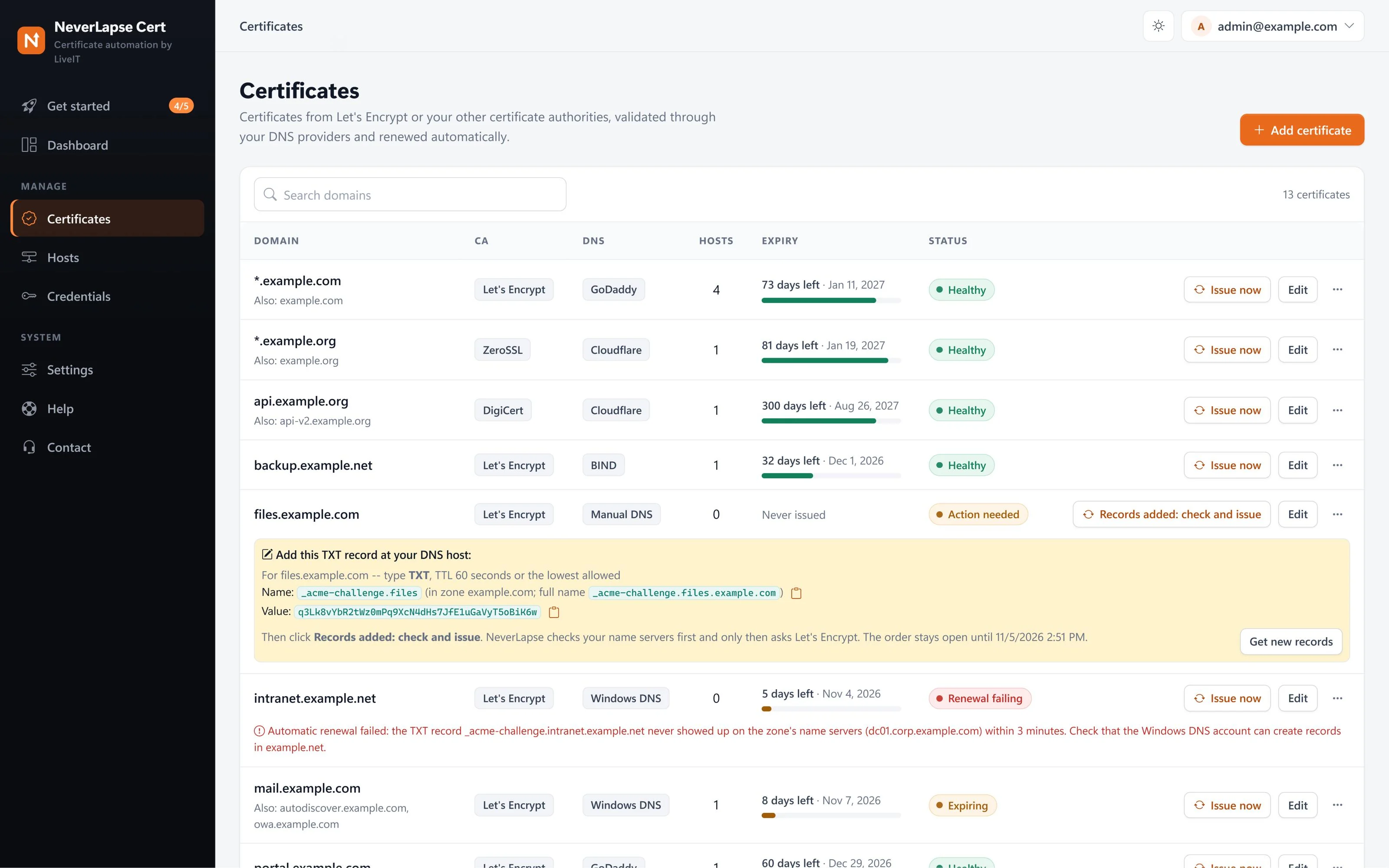
With NeverLapse DNS, included with your license, you add one CNAME per domain, once, and every renewal runs by itself, with no key to your DNS. Or use Manual DNS: a window walks you through it, shows the exact TXT records to add, with copy buttons, checks your name servers by itself until they're there, and only then asks the CA. At renewal time it emails you the new record.
- Name and value ready to copy
- Checked against your own name servers first
- Order stays open while you add it
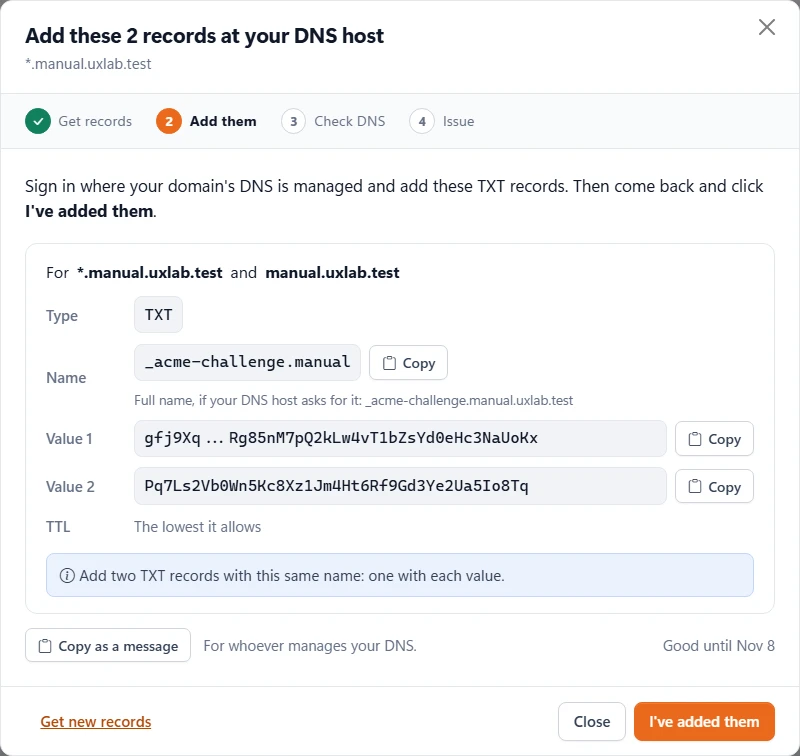
Free or paid: your choice of certificate authority
Let's Encrypt is built in. Add ZeroSSL, Google Trust Services, DigiCert, Sectigo, SSL.com, GoDaddy or any other ACME CA with one click and its EAB keys, then pick the CA per certificate.
- One-click presets for the big CAs
- Test the connection before you use it
- Move a certificate to another CA with one setting
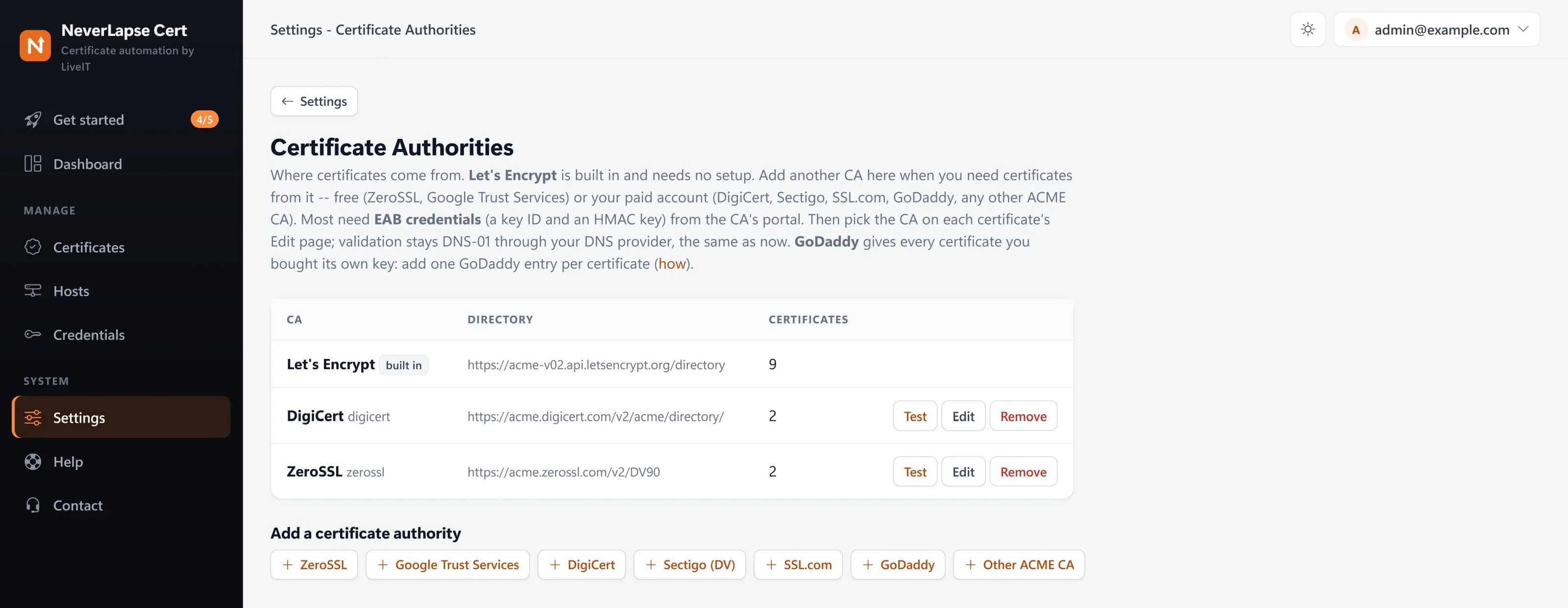
Put it on every server that uses it
Add the servers once. NeverLapse pushes new certificates to servers it can reach, and a small agent pulls them on servers it can't: behind NAT, in another domain, at a customer's site or in the cloud. Nothing has to connect in.
- Windows, IIS, Linux, HAProxy, OPNsense, Veeam Cloud Connect, VMware Cloud Director
- See every agent's version and last check-in
- Update agents from the console, one, some or all
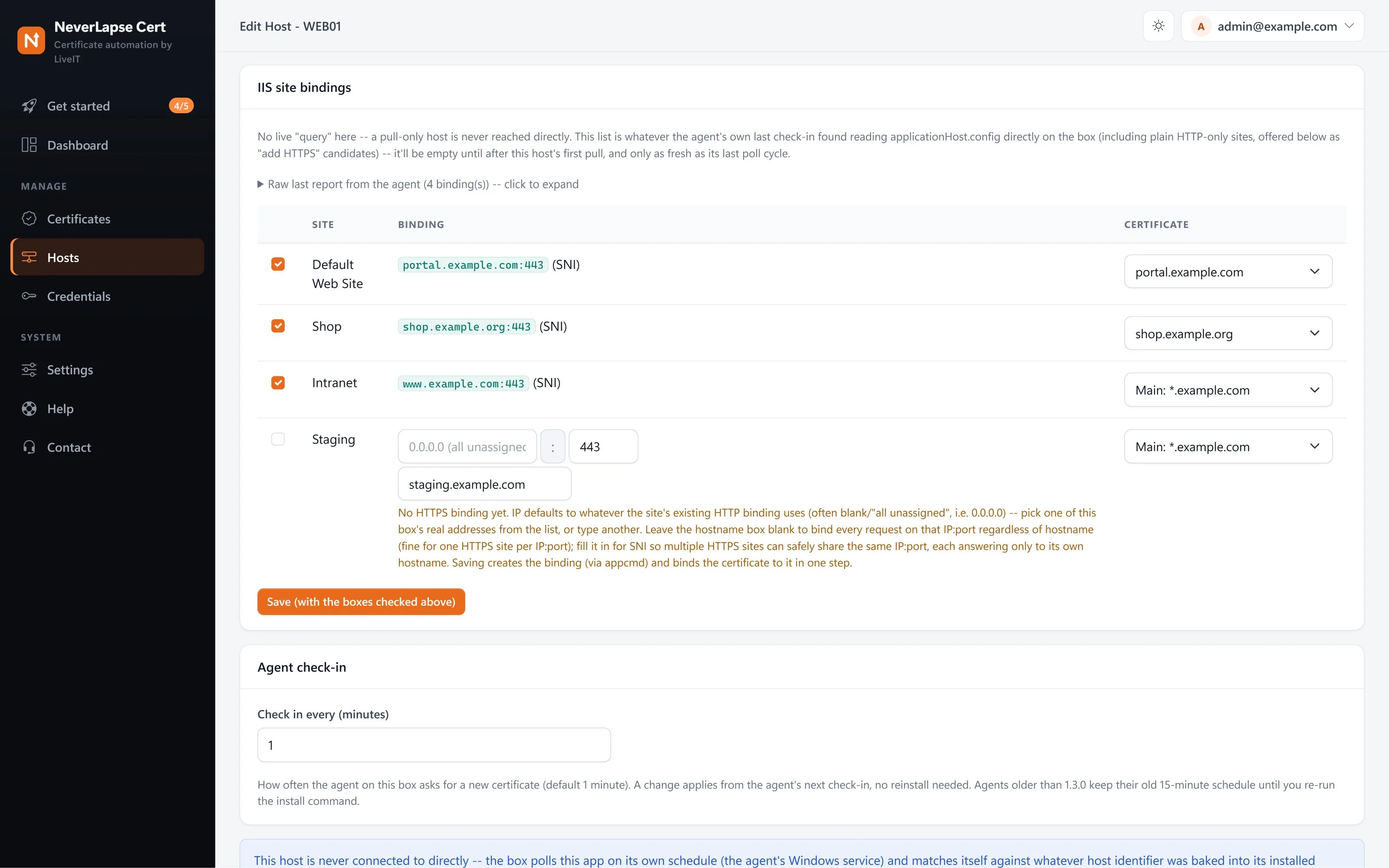
Pick the IIS sites, it does the bindings
On an IIS server NeverLapse lists every site and binding it finds. Tick the ones to update and pick the certificate for each, including SNI bindings, or add HTTPS to a site that only has HTTP today.
- A different certificate per binding
- Adds the HTTPS binding for you
- Works through the agent, nothing connects in
Locked down by default
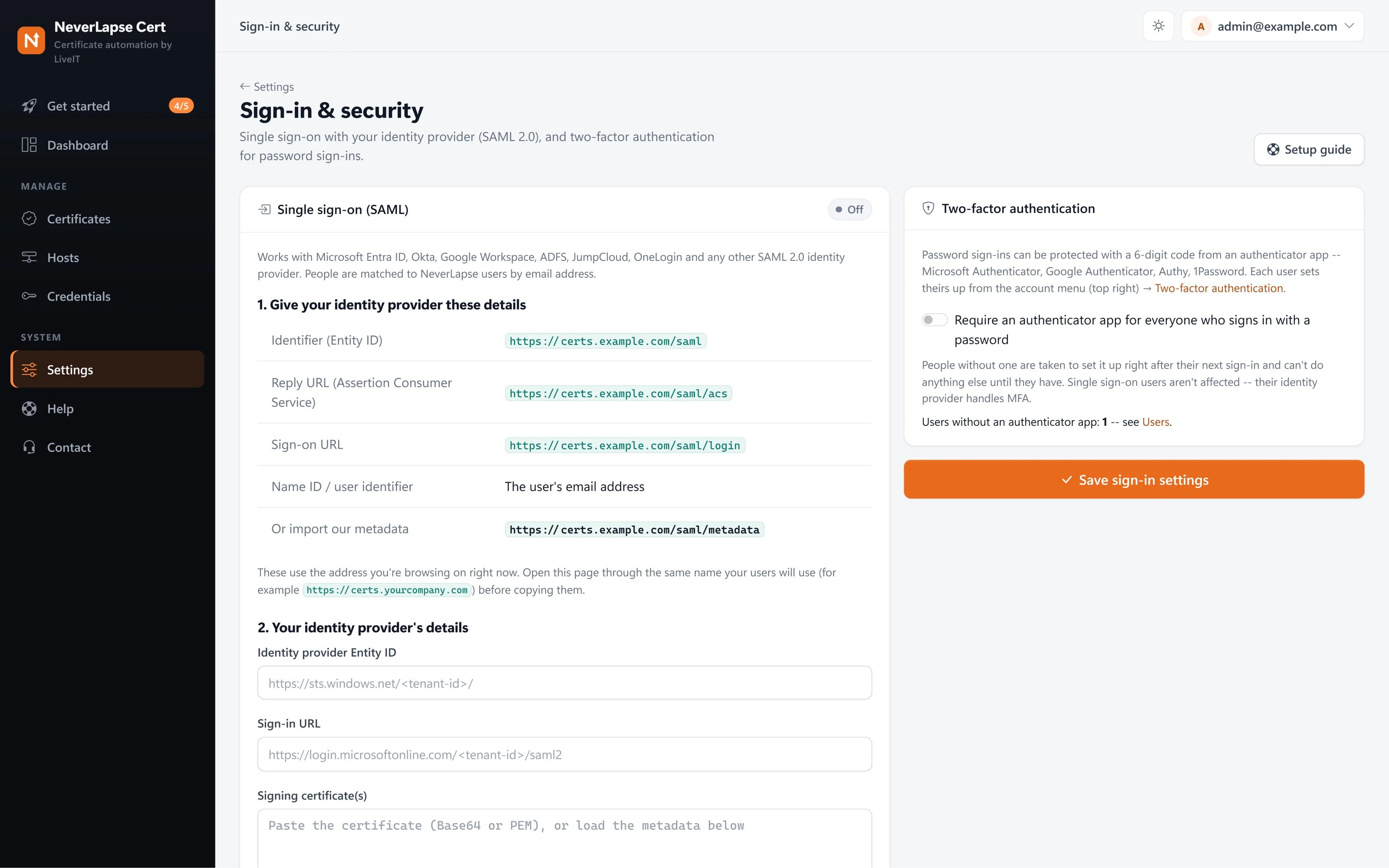
DNS tokens, Windows logins and API keys are stored encrypted on your server and never shown again after you save them. Sign in with your own identity provider, and require two-factor for everyone else.
- Single sign-on with Microsoft Entra ID, Okta, Google Workspace or any SAML provider
- Two-factor sign-in with any authenticator app
- Private keys never leave your network
Tells you what it did
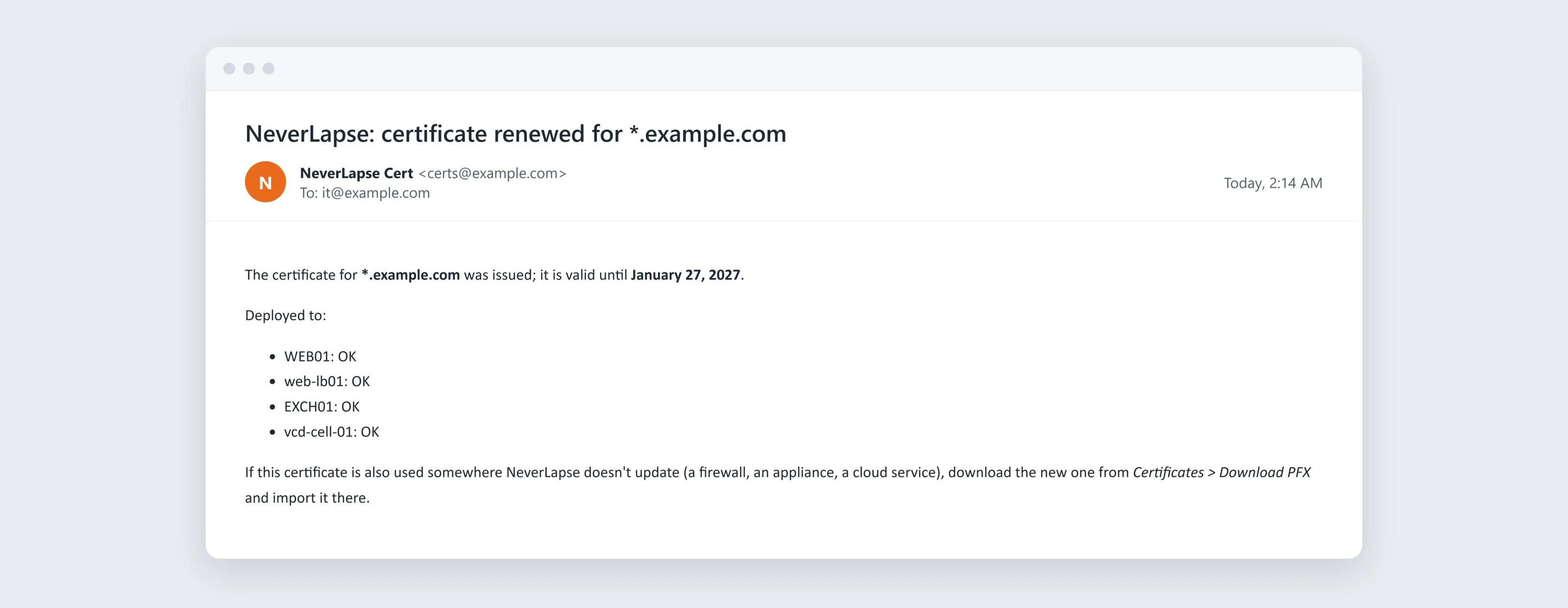
After a renewal NeverLapse can email the new expiry date and where the certificate went, server by server, plus a reminder for anywhere it doesn't update itself. Failed renewals are emailed too.
- Optional email on every renewal
- Deploy result per server
- Reminder for firewalls and cloud services you import by hand
The servers and appliances you already run
Every renewal goes back out to everything that uses that certificate, the same way every time.
IIS
Imports the certificate and rebinds the HTTPS sites you pick, including SNI bindings. Pushed, or pulled by the agent.
Exchange
The agent on each Exchange server imports the certificate and turns it on for IIS, SMTP, POP or IMAP. No script to write.
Remote Desktop Services
The agent on the broker puts the certificate on RD Gateway, RD Web Access and the broker roles, checks it and rolls back.
Windows servers
Into the Windows certificate store, domain-joined or workgroup, with an optional PFX file and your own script after each install.
Apache
Picks the sites, writes the files and the HTTPS config, and reloads Apache. RHEL, Ubuntu, Debian, SLES and more.
nginx
Finds the server blocks, writes the certificate, tests with nginx -t, reloads and checks the site. Rolls back if anything fails.
Apache Tomcat
Writes the keystore, points server.xml's HTTPS connector at it, restarts Tomcat and checks the port. Rolls back if anything fails. Linux and Windows.
HAProxy
One certificate per frontend, or every certificate in an SNI folder for a reverse proxy in front of many sites.
OPNsense
Updates the HAProxy plugin on OPNsense firewalls through OPNsense's own API.
Veeam Cloud Connect
Imports and assigns the Cloud Connect gateway certificate, pushed or through the agent.
VMware Cloud Director
Swaps the cell certificate for the portal, API and consoles, checks it's live, and rolls back if it isn't.
Anything else
PEM or PFX files in a folder on Windows or Linux, plus your own script. Firewalls get a step-by-step import guide.
Why not scripts on every server?
| By hand | A script per server | NeverLapse Cert | |
|---|---|---|---|
| Renews before expiry | If someone remembers | ||
| One place to see every certificate | A spreadsheet | Log in to each server | |
| Same certificate on many servers | Copy it around | Separate certificates, or glue scripts | Issued once, installed everywhere |
| Servers behind NAT or at customer sites | Remote in | Pull agent, nothing inbound | |
| IIS, Exchange, Remote Desktop, Veeam, OPNsense, VMware Cloud Director | By hand, every time | Write it yourself | Built in |
| DNS credentials | - | On every server | Encrypted, in one place |
| Tells you when something fails | Your users do | Check the logs | Email, with the reason |
| Two-factor sign-in and SSO | - | - |
Up and running in an afternoon
Start a trial
Enter your email; the license key and download link arrive right away.
Install
One installer on Windows Server (with SQL Server Express), or a package for Linux or Docker (with PostgreSQL). No IIS needed.
Add a domain
Connect your DNS provider, add the names and wildcards, and issue with one click.
Point it at servers
Add hosts or install an agent. From then on renewals and deployments happen by themselves.
Want to see it step by step first? Issue a certificate and put it on IIS, with screenshots.
Every feature in every plan
Pick a plan by how many certificates and hosts you manage. Monthly, cancel any time. Pay yearly and save up to 17%.
Starter
For a single site or a small office.
Professional
For growing businesses and small MSPs.
Business
For MSPs and larger environments.
Enterprise
No limits.
Frequently asked
What do I need to run it?
One server, and a virtual machine is fine. On Windows Server 2016 or newer the installer sets up everything, including SQL Server Express, or uses a SQL Server you already have; IIS isn't needed. Or run it on Ubuntu 22.04/24.04 or Debian 12/13, or in Docker, with PostgreSQL. Windows DNS and pushing to Windows servers need the Windows version; agents work from either. See Requirements and Install on Linux or Docker.
Do I have to open ports to the internet?
No. Domain ownership is proved through DNS, so nothing has to be reachable from the internet, and agents only make outgoing HTTPS connections to your NeverLapse server.
Which certificate authorities work?
Let's Encrypt is built in and free. ZeroSSL, Google Trust Services, DigiCert, Sectigo, SSL.com, GoDaddy and any other ACME CA can be added in Settings with the credentials your CA gives you. See Certificate authorities.
My DNS host isn't in the list. Can I still use it?
Yes. NeverLapse connects straight to Cloudflare, GoDaddy, Azure DNS, Amazon Route 53, Google Cloud DNS, Namecheap, IONOS, cPanel, DigitalOcean, DNS Made Easy, DNSimple, Name.com, Windows DNS and BIND. For any other DNS host: with NeverLapse DNS, included with NeverLapse Cert, or your own acme-dns server, you add one CNAME per domain, once, and renewals run by themselves. With Manual DNS, NeverLapse shows you the exact record to add, checks it's there before asking the CA, and reminds you at renewal time. See Manual DNS.
Does it work for Linux servers and appliances?
Yes: Apache, nginx, Apache Tomcat, HAProxy, OPNsense, Veeam Cloud Connect, VMware Cloud Director cells and any Linux server through the agent. Firewalls such as FortiGate, Cisco ASA and Firepower get a step-by-step import guide. See Hosts.
Where do my private keys and credentials live?
On your own server, in your own database. Secrets are stored encrypted. The daily license check sends the license key, an installation ID, the server name, the version and how many certificates and hosts you have: nothing about your domains, servers or credentials. See the privacy policy.
What happens when the trial ends?
Buy a plan and the same license key keeps working, so nothing on your server changes. If a subscription ends, the console stops accepting changes but renewals and deployments keep running for 30 more days, so nothing expires by surprise. See License.
How do I update NeverLapse Cert?
From inside the app: Settings > Updates shows what's installed and what's out now, and installs a new version with one click. It backs up first and goes back to the old version by itself if the new one doesn't start. See Updates and all releases.
Who builds and supports it?
LiveIT Consulting Group, an MSP that has supported businesses in the DFW Metroplex since 2009. It grew out of the certificate tool we built for our own servers. Questions go straight to the engineers who build it.
Stop renewing certificates by hand
14 days free, every feature, no credit card. Install it this afternoon.
Start a free trial Book a demo